

A very warm welcome to our site to both Users and Sellers
Create Your Account
First select Profile
A drop-down panel appears . At the bottom select Sign up.
Complete the form
Especially the last 2 tick boxes …
¦ ¦ “I accept the terms of the service”
Tick the following box ONLY if you are a member of AYB
¦ ¦ “Sign up as an AYB member and are therefore entitled to post
___________________________________
Adding Your Item
Select the box Add your item
Enter the price as figures only in the first box
Start typing in the manufacturer; be very careful to spell correctly, or your listing will be excluded from searches. In this example the fake name abracadabra returns a message “No results found.”
If this happens to you, select the plus sign, and your new entry for the manufacturer will be added when the listing is saved.
(note, sometimes your entry is lost before you save the listing.
In that case, you have to enter it again and try saving the listing again.
Continue entering other fields in the Listing Item Details section that apply to your boat.
Fields with an asterisk must be filled.
Price has to be entered a second time, at present, for technical reasons
When entering the location, type in until you get a dropdown list or single item to select.
When you have selected an option, the two fields, Latitude and Longitude, will be completed automatically as confirmation. This controls the location map.
(It is possible to enter just Longitude and Latitude manually, but typing the name if a town is usually quicker and easier)
Enter Sellers Notes
Formatting is available in the top bar of this section.
If you copy and paste from a webpage, much of the formatting will be copied.
(Tell a good story to enthuse buyers!).
Upload Photo
Every Listing currently invites browsers to
- Insure the yacht.
- Schedule a viewing.
- Share the listing
- Add to compare
- Print the page
All of which encourage browsers to engage as well as the option to call or message the named seller.
Listing Features
We intend to add to these lists and welcome your suggestions via Contact in the menu.
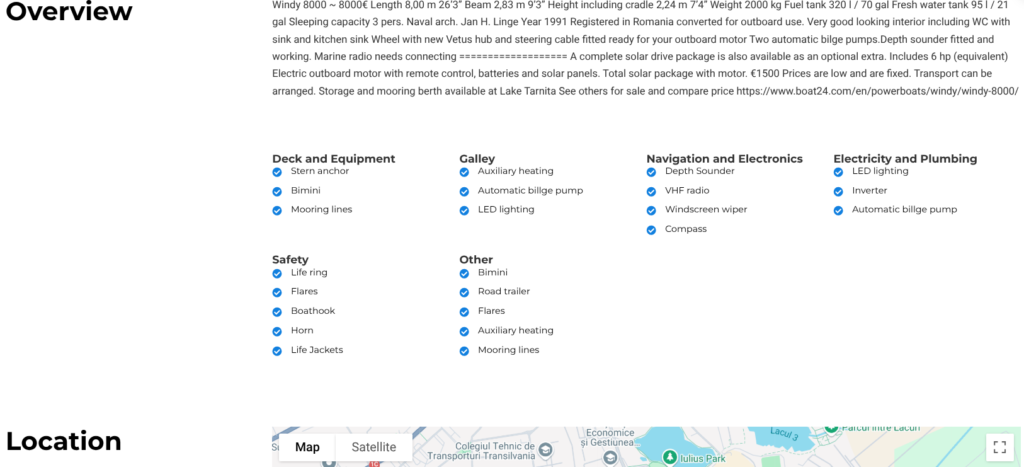
Just tick what you want to show; unticked features will not appear.
The items you tick will appear (along with the column headers) Just below your description and above the Location map
as in the following screenshot